
ADVERTISEMENT
Dust: What It Really Is (And Why It’s Everywhere)
Before blaming your TV, it helps to understand what dust actually is.
Household dust isn’t just dirt from outside. It’s a constantly circulating mix of:
Dead skin cells (yes, mostly human)
Fabric fibers from clothes, carpets, and furniture
Pet dander
Pollen
Soil particles tracked in from outside
Smoke residue
Microscopic plastic fibers
Hair fragments
Insect debris
Dust is lightweight, easily airborne, and always moving. Even in a closed room, dust is being lifted and redistributed every time you:
Walk across the floor
Sit on furniture
Turn on a fan or HVAC system
Open or close a door
Run electronics
Your TV just happens to be one of the best places for dust to land—and stay.
The Biggest Culprit: Static Electricity
One of the primary reasons TVs attract dust is static electricity.
How Static Builds Up on TVs
Modern TVs—especially LCD, LED, and OLED screens—are made with materials that easily build static charges. When the TV is on (and sometimes even when it’s off), electrical activity causes electrons to accumulate on the surface.
This creates an electrostatic field that:
Pulls lightweight dust particles out of the air
Makes dust cling stubbornly to the screen
Causes dust to resist falling off naturally
In simple terms: your TV becomes a magnet for dust particles floating in the room.
Why the Screen Is Worse Than Other Surfaces
Compare your TV screen to a wooden table:
Wood is less prone to static
Wood has texture that doesn’t hold charges evenly
Glass and plastic (used in screens) are smooth and excellent at holding static
That’s why dust sticks so aggressively to screens and seems to reappear minutes after cleaning.
Heat: The Invisible Dust Conveyor Belt
Another major factor is heat.
TVs generate heat during operation—especially larger models and older units. That heat doesn’t just disappear; it rises, creating small convection currents around the TV.
What Heat Does to Dust
Warm air rises from the TV
Cooler air is pulled in from below and around it
Dust particles ride these air currents
Dust gets deposited on nearby surfaces as airflow slows
This creates a localized dust circulation zone around your TV.
That’s why you often notice dust:
On the TV stand
On shelves beneath the TV
On the wall directly behind or above it
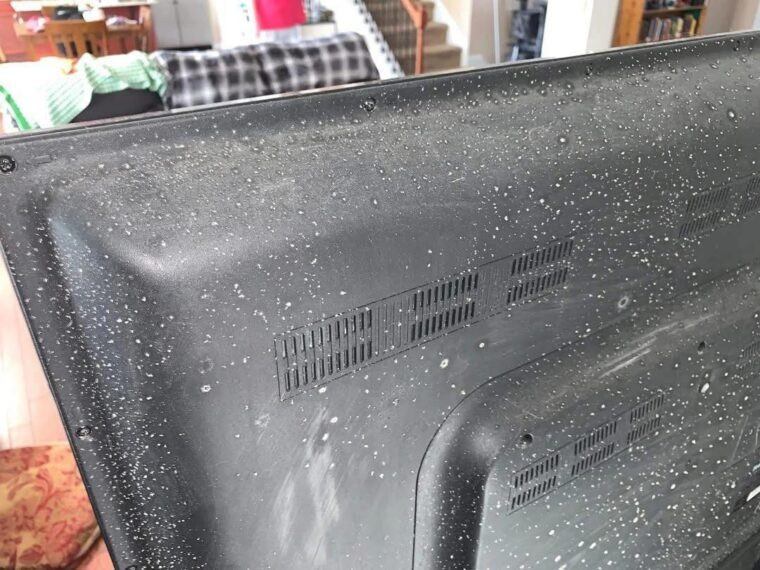
Around vents or ports on the back
Your TV is essentially stirring the air in a small, continuous loop.
Airflow Patterns You Don’t See
Even in a room that feels still, air is always moving.
HVAC Systems and Dust Accumulation
If your TV is near:
An air vent
A return duct
A window
A frequently used doorway
…it’s likely sitting in a high-traffic air zone.
Dust follows airflow, and when that airflow slows or changes direction—such as around a large flat surface like a TV—dust settles.
The TV becomes a dust landing strip.
Why Dust Gathers Around the TV, Not Just On It
Many people notice something odd: even if the screen itself isn’t terribly dusty, the area around the TV often is.
Here’s why.
The TV as a Physical Obstacle
A TV is:
Wide
Flat
Vertical
Often positioned against a wall
This makes it a perfect interruption in airflow.
When moving air hits the TV:
Some air rises
Some diverts sideways
Some slows down
When air slows down, dust falls out of suspension.
That’s why dust accumulates:
On the stand or console
On soundbars
On decorative items near the TV
On the wall edges and corners nearby
Electronics Create Micro-Vibrations
TVs don’t just sit there quietly. Internally, they produce tiny vibrations from:
Cooling systems
Electrical currents
Speakers
Power supplies
These vibrations can:
Shake loose dust from surrounding surfaces
Prevent dust from settling evenly
Encourage dust to migrate to nearby flat areas
The result? Dust redistributes itself around the TV zone more than elsewhere.
The Role of Cables and Ports
Take a look behind your TV and you’ll probably find:
HDMI cables
Power cords
Cable boxes
Streaming devices
Gaming consoles
Each cable and port creates:
Surface area for dust to cling to
Static-prone plastic insulation
Tiny ledges where dust collects
Cables also disrupt airflow, creating pockets where dust naturally settles.
The more electronics you have connected, the more dust-catching surfaces you introduce.
Screens vs. Walls: Why Both Get Dusty
People often ask why the wall behind the TV gets dusty too.
Static Transfer and Airflow
Static electricity doesn’t stop at the screen
Charged surfaces influence nearby air particles
Dust pulled toward the screen often overshoots and lands behind it
Heat rising from the back of the TV pushes dust upward
If your TV is mounted close to the wall, this effect is even stronger.
Why TVs Seem Worse Than Computers (Sometimes)
You might wonder: Why doesn’t my laptop or phone get this dusty?
A few reasons:
TVs are larger, creating more airflow disruption
TVs are stationary, so dust accumulates continuously
Phones and laptops are handled and wiped frequently
TVs often sit near walls, corners, and outlets—dust-prone areas
A TV is the perfect storm: large surface, constant static, steady heat, and minimal disturbance.
The Human Factor: How We Make It Worse
Without realizing it, we contribute to TV dust buildup.
Everyday Habits That Increase Dust
Wearing synthetic fabrics that shed fibers
Having pets (especially cats and dogs)
Not removing shoes indoors
Using ceiling fans
Rarely opening windows
Infrequent HVAC filter changes
Vacuuming without HEPA filtration
Dust doesn’t appear out of nowhere—it’s being generated constantly.
Your TV just happens to be a prime collection point.
Why Cleaning the TV Feels Pointless
You clean the screen.
It looks perfect.
Two days later—dust again.
This happens because:
Static builds back up immediately
Airborne dust never stops circulating
Cleaning often stirs dust into the air
Dry cloths can increase static
Ironically, how you clean your TV can make dust return faster.
The Right Way to Reduce TV Dust (Not Eliminate It)
You can’t completely stop dust—but you can reduce how noticeable it is.
- Use a Slightly Damp Microfiber Cloth
Dry cloths increase static.
A lightly damp cloth:
Removes dust
Reduces static charge
Slows re-accumulation
Never spray liquid directly on the screen.
- Clean Surrounding Areas First
If you only clean the TV, dust from nearby surfaces will settle back onto it.
Always clean:
The TV stand
Nearby shelves
Soundbars
The wall behind the TV
Work top to bottom.
- Improve Air Filtration
Change HVAC filters regularly
Consider a HEPA air purifier in the living room
For Complete Cooking STEPS Please Head On Over To Next Page Or Open button (>) and don’t forget to SHARE with your Facebook friends
ADVERTISEMENT
